The economist’s data analysis skillset.
NJ raised its minimum wage. Employment did not fall.
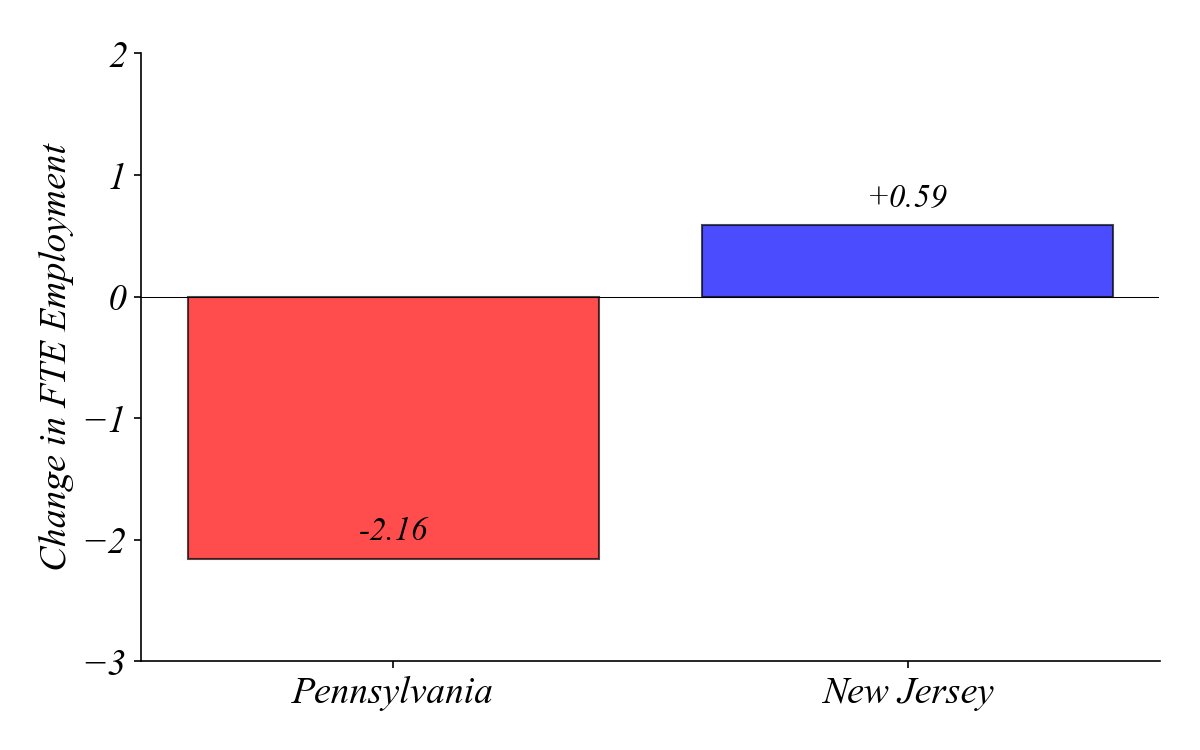
The same 410 stores, surveyed twice
| Store | Wave | State | FTE |
|---|---|---|---|
| 1 | 1 | NJ | 20.5 |
| 1 | 2 | NJ | 24.0 |
| 2 | 1 | PA | 18.0 |
| 2 | 2 | PA | 17.5 |
| … | … | … | … |
> same stores, two time periods, tracking each store’s change
Data with repeated observations across entities AND time
Each observation is a separate row
| Shop | Hours | Quantity |
|---|---|---|
| Shop A | 12 | 1 |
| Shop A | 15 | 2 |
| Shop A | 14 | 2 |
| Shop A | 16 | 2 |
| Shop A | 19 | 1 |
| … | … | … |
> Shop (\(i\)) and Hours (\(t\)) are indexes; Quantity (\(x\)) is the variable
Use Coffee_Sales_Receips.csv to help understand where to hire a new barista.
Q. Which coffee shop is the busiest?
| Shop | Hours | Quantity |
|---|---|---|
| Shop A | 12 | 1 |
| Shop A | 15 | 2 |
| Shop A | 14 | 2 |
| Shop A | 16 | 2 |
| Shop A | 19 | 1 |
| … | … | … |
> as is usually the case, it’s difficult to know without summarization
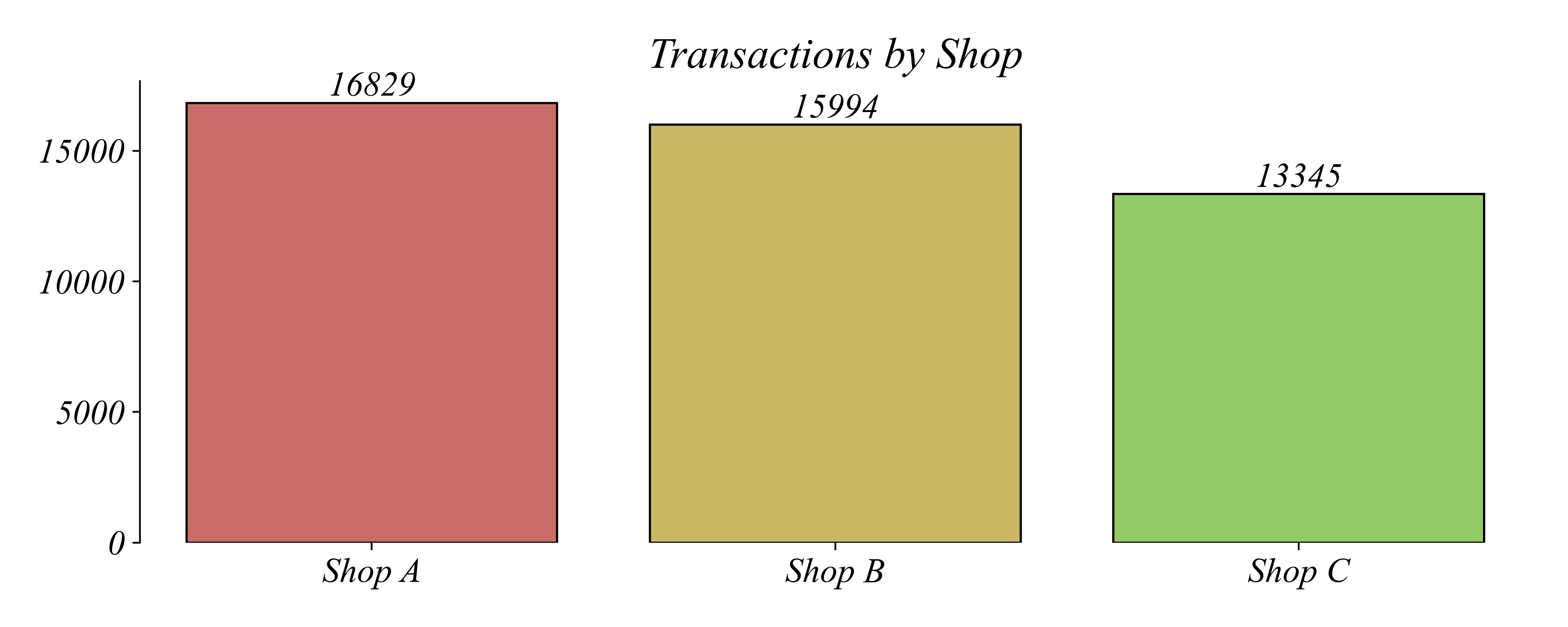
Q. Which coffee shop is the busiest?
> a bar chart makes it easy to compare shops’ busyness
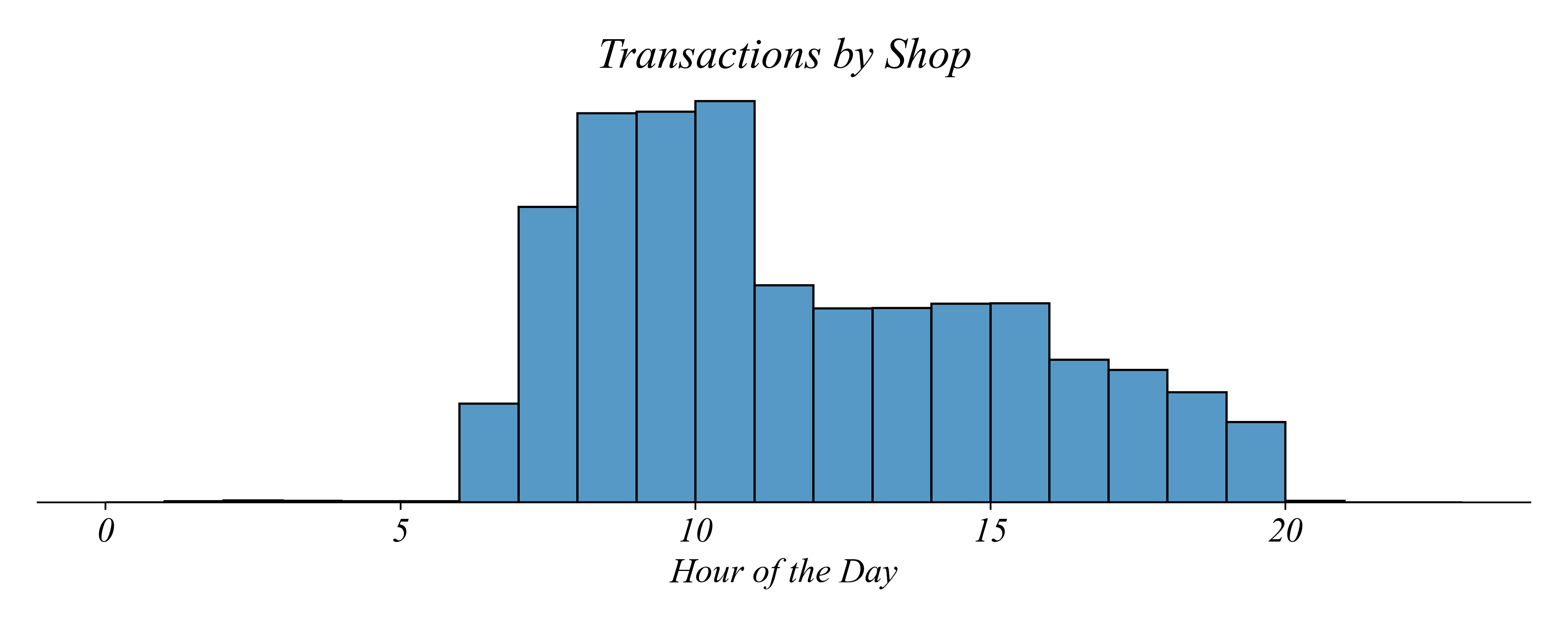
Q. What time of day is the busiest?
> a histogram makes it easy to compare transactions by time of day
> does this mean the morning shift at Shop A is the busiest?
Q. Which shift is the busiest?
> an overlaid histogram can show all three groups
> does this show the data clearly?
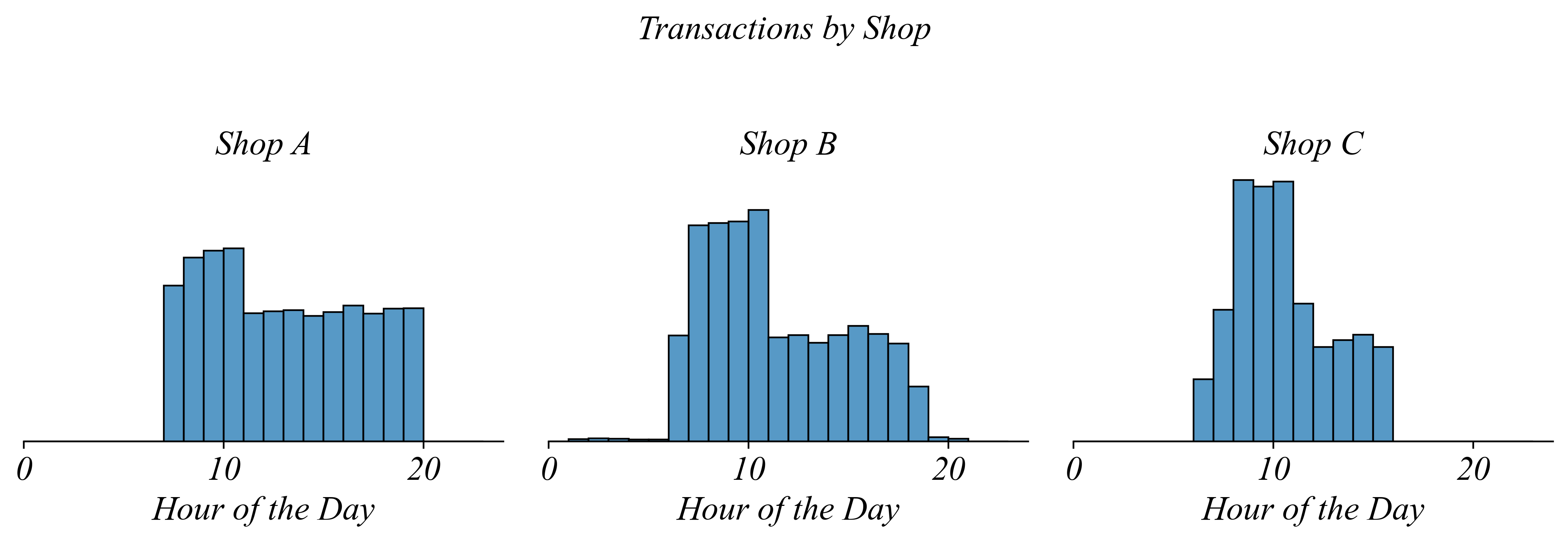
Each shop gets its own panel
> same data, but now each shop has its own histogram
Q. Which shop has the most consistent traffic throughout the day?
> Shop A — the distribution is relatively flat
Q. Which shop is busiest during the morning rush?
> Shop C — compare the 8-10am peaks across panels
> but since the histograms are separated it’s not as easy to make the comparison
Q. Which shop is busiest during the morning rush?
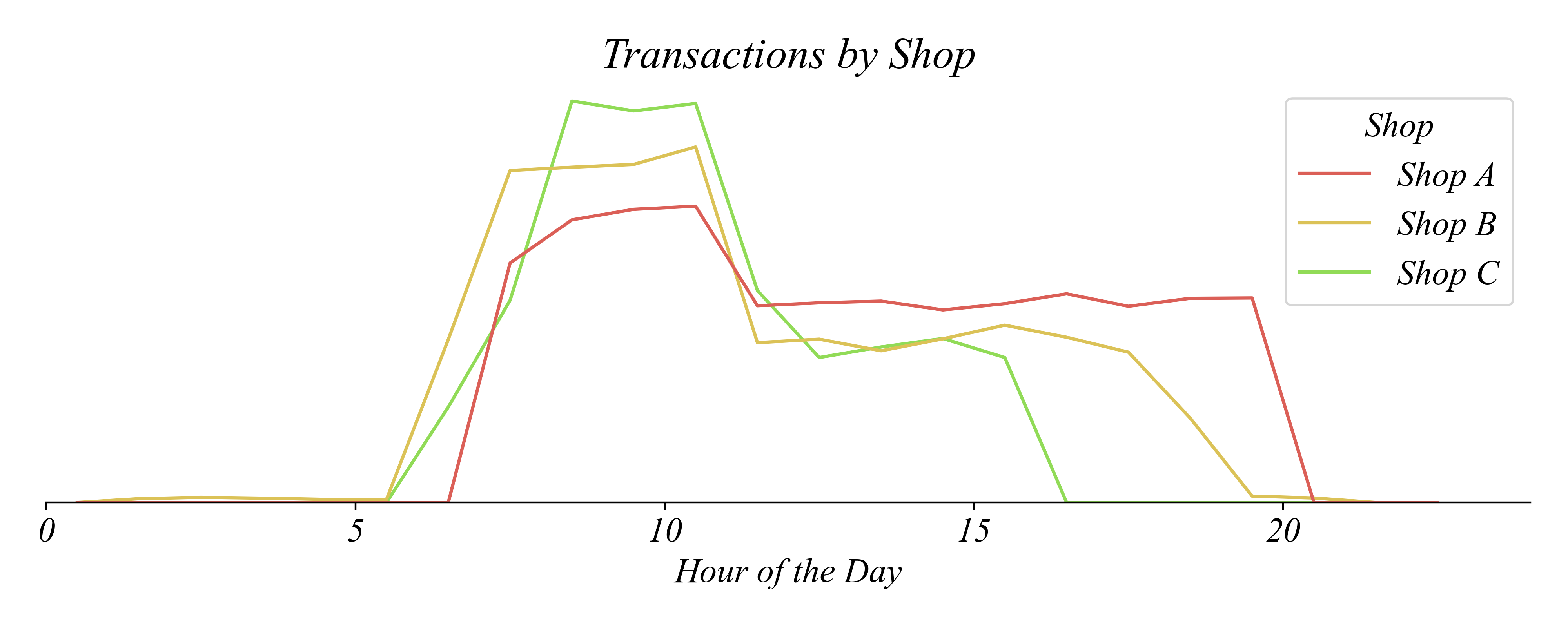
> line graphs can also show comparisons between groups clearly
> Shop C — easier to see the 8-10am peak across shops
What we just did
| Step | Action |
|---|---|
| SELECT | All transactions from three coffee shops |
| TRANSFORM | Group by shop and hour; count transactions |
| ENCODE | Hour → x-position; Count → y-position; Shop → color/facet |
What this unit adds to your toolkit
| Block | Part 1.4 |
|---|---|
| Variables | Numerical |
| Structures | Panel (long format) |
| Operations | Groupby |
| Visualizations | Multi-line, Facets |
> Next: Wide format panel data for comparing time periods
Use Coffee_Sales_Receips.csv to help inform where to hire a barista.
| Shop | Hours | Quantity |
|---|---|---|
| Shop A | 12 | 1 |
| Shop A | 15 | 2 |
| Shop A | 14 | 2 |
| Shop A | 16 | 2 |
| Shop A | 19 | 1 |
| … | … | … |
> Shop (\(i\)) and Hours (\(t\)) are indexes; Quantity (\(x\)) is the variable
> this is Long-Format Panel Data: transactions are all in the same column
Use Coffee_Sales_Receips.csv to help inform where to hire a barista.

Use Coffee_Sales_Receips.csv to help inform where to hire a barista.

Use Coffee_Sales_Receips.csv to help inform where to hire a barista.

Use faceting to give each shop its own panel.

The Groupby Approach: Create a summary table, then plot
# Create a summary table
counts = sales.groupby(['Shop', 'Hours']).size().reset_index(name='Count')
counts.head()| Shop | Hours | Count |
|---|---|---|
| Shop A | 6 | 12 |
| Shop A | 7 | 45 |
| Shop A | 8 | 67 |
| Shop A | 9 | 58 |
| Shop A | 10 | 42 |
| … | … | … |
The Groupby Approach: Create a summary table, then plot

The Shortcut: Let histplot do the counting for you
# Multiple-Line Graph using histplot shortcut
sns.histplot(sales, x='Hours', hue='Shop', bins=range(0,24,1), element='poly', fill=False)
Sometimes we need data in a different shape
| Shop | Hours | Quantity |
|---|---|---|
| Shop A | 12 | 1 |
| Shop A | 15 | 2 |
| Shop A | 14 | 2 |
| Shop A | 16 | 2 |
| Shop A | 19 | 1 |
| … | … | … |